One head that drew and drilled
The old way to make a board on my printer had one quiet virtue: the pen and the drill were the same head. I drew the traces and I drilled the holes without ever moving the board. Whatever offset there was between "where the pen thinks the origin is" and "where the drill thinks the origin is" was one fixed number. I calibrated it once, and after that the pads and the holes lined up by construction. The board never moved, so nothing could drift.
That is a nice place to be. You forget how nice until you leave it.
This post is about leaving it. I moved from a drawn-resist process to a laser, and the moment I did, that shared origin was gone. This is the software I wrote to get it back, and the much larger amount of work I spent making sure the software could not quietly drive a spinning bit into copper.
The laser broke the shared offset
With the laser, the board goes through more than one head. I laser the resist, then I switch to the spindle, the drill, to make the holes. Sometimes I take the board out of the printer entirely to etch it in ferric chloride, then clamp it back down. Each of those steps moves the board relative to the machine, and there is no longer a single offset I can trust. The laser origin and the drill origin are two different things now, separated by however I happened to place the board this time.
The first board I drilled this way landed a little off the pad. Not by much. Enough that a hole on the edge of a pad is a bad hole.
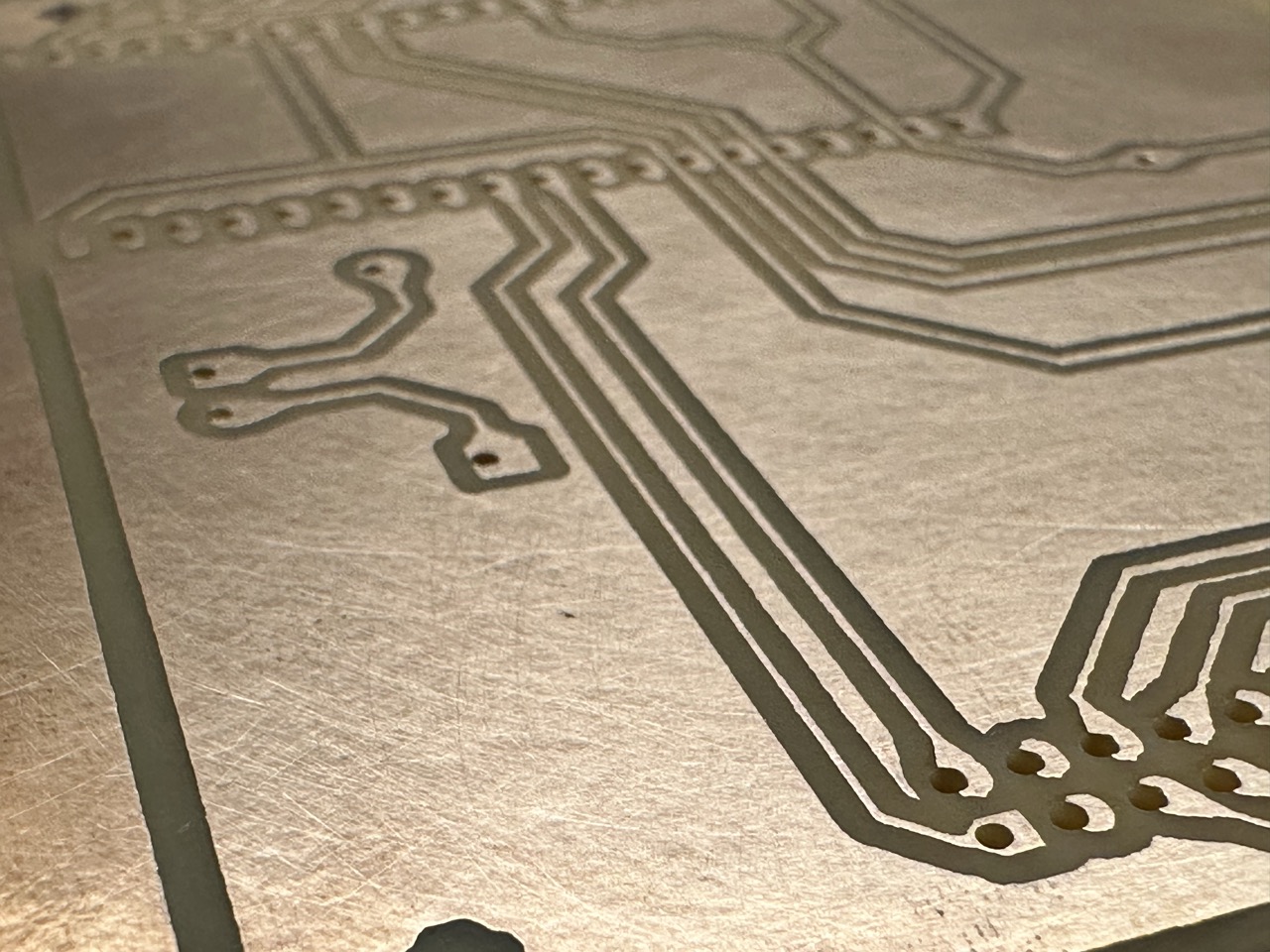
The obvious fix is to nudge the board until it lines up. That is where the trouble starts. I cannot compensate in the G-code, because the G-code is already generated against an ideal origin. My only knob is the physical board: shove it a hair in X, a hair in Y, rotate it a fraction of a degree, and try to make every hole land on every pad at once. With a few holes you can eyeball it. With a hundred and thirty holes across a board, you cannot. Getting one corner right pushes the far corner wrong.
Doing it by hand is a trick, and a trick is exactly the kind of thing I did not want to keep in my head.
Alignment as a solved value
So I stopped trying to move the board into agreement with the G-code, and wrote software to move the G-code into agreement with the board.
The idea is small. I jog the bit down onto three or four known pads, the fiducials, and record where the machine actually is at each one. Now I have pairs: this board point maps to this machine point. From those pairs the app fits an affine transform by least squares, the transform that best maps board coordinates to machine coordinates. Every hole in the design gets pushed through that transform on its way to the wire. The board can sit crooked and shifted, and the holes still land, because the math absorbed the crookedness.
The part I care about most is not the fit. It is the residual. The fit always produces some answer, even from bad inputs, so the number that matters is how badly the fitted transform misses the points I gave it. A small residual means the pads I touched are consistent with a rigid board. A large residual means something is wrong: I mis-touched a pad, or picked the wrong fiducial, or the board is not what the design says. The residual is the honesty signal. When it is too large, the button that would start drilling is simply not reachable.
The alignment stops living in my memory and starts living in a number the app can check.
Two more decisions came out of building it. The first: it started as a small Elixir and Phoenix web app with a server, and one day I asked whether it needed a server at all. I wanted anyone to open it and use it, with nothing to install. A browser can talk to a USB serial device directly through the Web Serial API, which means the browser can drive the printer with no backend in the middle. So I deleted the backend.
What looked like a deployment convenience turned out to matter for safety. With no server, the only thing standing between me and the drill bit is the type checker in the browser, which is the subject of the rest of this post.
The second: I wrote it in Gleam. Gleam compiles to JavaScript, it runs in the browser, and its type system lets me say things about states that the compiler then enforces. That last property is the whole game.
Making the bad states unrepresentable
Here is the principle the whole design is built on, said plainly: turn the dangerous defaults I would have to remember into states the machine must pass through. If the wrong thing cannot be expressed, I cannot do it by forgetting.
A drilling run has an order to it. You load a board, you register it against the real machine with the fiducials, you run a dry-run with no spindle to rehearse the motion, and only then do you drill for real. The dangerous shortcut is to skip the rehearsal and drill straight after aligning. In most tools that shortcut is a button you are trusted not to press, or a checklist line you are trusted to read.
In this app it is not a button. It is an edge that does not exist.
The job is a state machine written as a plain sum type, and every legal move is one
line in a case. The move from Aligned straight to Drilling is not one of those
lines. It is not disabled or hidden. There is no event in the whole type that
expresses it.
pub fn transition(job: Job, event: Event) -> Result(Job, TransitionError) {
  case job.state, event {
    // aligned -> dry_run : run the mandatory dry-run rehearsal
    Aligned, RunDryRun -> Ok(Job(..job, state: DryRun))

    // dry_run -> drilling : confirm registration — the ONLY path to drilling
    DryRun, ConfirmRegistration -> Ok(Job(..job, state: Drilling))

    // dry_run -> aligned : redo the alignment and rehearse again
    DryRun, RedoAlignment -> Ok(Job(..job, state: Aligned))

    // ... every other pairing:
    _, _ -> Error(IllegalTransition)
  }
}
To reach Drilling you must go Aligned → DryRun → ConfirmRegistration. A caller
who tries to skip the rehearsal does not get a warning. There is no Event value
that means "skip it," so the code that would do it cannot be written. The catch-all
on the last line turns every unlisted pairing into a typed error instead of a crash,
so a stray event can never move the machine somewhere unsafe.
The same shape shows up everywhere once you start looking. Motion commands only exist in the state where the motors are energized, so "jog a de-energized axis" is not a checked mistake, it is an unwritable one. A refused command returns an empty list of bytes to send, so a refusal physically cannot put anything on the wire. None of these are runtime guards I have to remember to add. They are the shape of the types.
The machine bit back
The principle is clean on paper. What makes me trust it is that the machine earned it: most of the safety in the app is a scar from a specific near-miss. One time a single fiducial captured at hover height tilted the surface plane just low enough that the dry-run snapped the bit on the first hole. But the sharpest lesson came from the abort itself, because the hazard was the safety feature.
When you confirm a real drill mid-rehearsal, the app has to stop the queued rehearsal
moves before it drills. My first version did that with Marlin's M410, which stops
the steppers instantly. Instantly, it turns out, means the axis that was moving loses
track of where it is. On one run the head was down in a hole when I confirmed, M410
fired, and the firmware's idea of Z was now wrong. The drill program's first move is
an absolute retract to a safe height, but the firmware believed it was already high,
so it did not lift. It dragged the bit across the copper.
I did not want to guess my way out of a bit-breaking bug, so I reproduced it in the emulator instead. That was the part that actually solved it.
The emulator keeps exact position through a stop; it does not model a stepper
physically losing steps. So when I replayed the crash in software, the run passed.
That failure to reproduce was the answer. It proved the G-code was correct given an
accurate position, which isolated the fault to the hardware: M410 was corrupting
the real machine's position, exactly the thing the emulator declined to model. The
fix was to stop aborting with M410 and drain the buffered moves with a plain M400
instead, so the head finishes with proper deceleration and its coordinates stay
intact. I had accepted M410's step-loss as a fair trade for a faster stop. A broken
bit is not a fair trade.
That is the pattern for almost every safety rule in the app. It was not designed in from wisdom. It is an incident report with the sharp edge filed off in the type system, so the next person, usually me next month, cannot fall into the same hole.
The finished tool
This is where it ended up: a single screen that walks you from a drill file to a
drilled board, one gated step at a time. It reads the Excellon .drl, shows the
holes colored by bit size, then makes you register, rehearse, and only then drill.
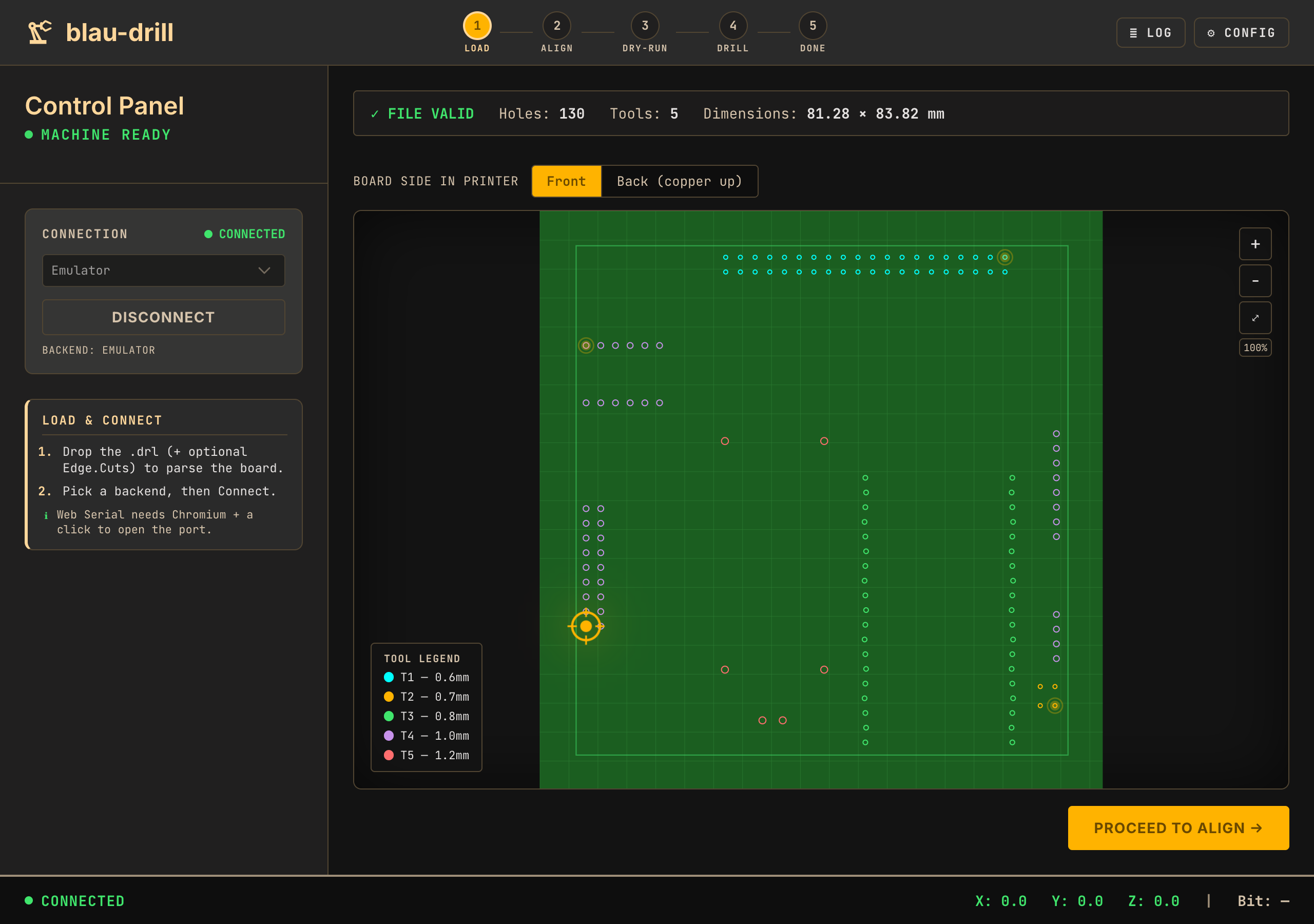
You can try it yourself. It runs entirely in the browser and talks to the printer over Web Serial, so you need a Chromium-based browser to connect. With no machine attached it defaults to the emulator, which is enough to walk the whole flow and watch the gates refuse to let you skip a step.
No robot arm, no autonomy, no grand claim. Just a modified printer, a browser tab, and a set of moves I made impossible to get wrong on purpose. The alignment ritual that used to live in my memory now lives in a number the app checks, and the dangerous shortcuts I used to trust myself to avoid are edges that were never drawn. What is next is more boring and more useful: enough real boards through it that I stop finding new near-misses to design out.
References & Links
- Blogatto · https://github.com/veeso/blogatto · Static-site framework
- Web Serial API · https://developer.mozilla.org/en-US/docs/Web/API/Web_Serial_API · MDN
- Gleam · https://gleam.run · Language
- Marlin M410 (Quickstop) · https://marlinfw.org/docs/gcode/M410.html · Marlin docs
- Marlin M400 (Finish Moves) · https://marlinfw.org/docs/gcode/M400.html · Marlin docs